Wednesday, May 29, 2013
MYSQL Create new user and Grant privileges
To Create a new user in mysql
CREATE USER 'UserName'@'localhost' IDENTIFIED BY 'Password';
To Grant user access to the Database
GRANT ALL PRIVILEGES ON DatabaseName . * TO 'UserName'@'localhost';
After that Flush the privileges so the changes will take affect.
FLUSH PRIVILEGES;

Friday, May 3, 2013
Error on IIS 7 or IIS 7.5 running .Net 1.1: \\?\C:\Windows\system32\inetsrv\config\applicationHost.config
If you try to change any property of an application that was build with dot net 1.1 on IIS 7 or IIS 7.5 get an error \\?\C:\Windows\system32\inetsrv\config\applicationHost.config. To fix this issue follow the instruction in this article.
This is an error you will get.
This is an error you will get.
There was an error while performing this operation.
Details:
Filename:
\\?\C:\Windows\system32\inetsrv\config\applicationHost.config
Error:
\\?\C:\Windows\system32\inetsrv\config\applicationHost.config
Error:
To fix this issue try this.
- Create the Framework64 directory for 1.1
md \windows\microsoft.net\framework64\v1.1.4322\config\ - Copy the 32bit config to 64bit config location created in step 1.
copy \windows\microsoft.net\framework\v1.1.4322\config\machine.config \windows\microsoft.net\framework64\v1.1.4322\config\
Read more about c:\windows\system32\inetsrv\config\applicationhost.config or contact us.
Tuesday, April 23, 2013
How to turn on or off full text indexing in MS SQL server with sp_fulltext_database
Here is the snytax for it.
action is an argument and it's type of varchar(20) and it could be enable or disable
To turn on full text indexing in MS SQL server with sp_fulltext_database try this.
To turn off full text indexing in MS SQL server with sp_fulltext_database try this:
sp_fulltext_database [@action=] 'action'
action is an argument and it's type of varchar(20) and it could be enable or disable
To turn on full text indexing in MS SQL server with sp_fulltext_database try this.
USE Database_name;
GO
EXEC sp_fulltext_database 'enable';
GO
To turn off full text indexing in MS SQL server with sp_fulltext_database try this:
USE Database_name;
GO
EXEC sp_fulltext_database 'disable';
GO
To run sp_fulltext_database you have to be db_owner or sysadmin
Wednesday, April 17, 2013
Login to MySql database form command line
To login to MySql database from a commend line you can use
mysql -u root -p;
after hitting enter system will ask you for the password or you can use this command
mysql -u root -pPassword;
Once login to the database you have to select the database to work with.
mysql -u root -p;
after hitting enter system will ask you for the password or you can use this command
mysql -u root -pPassword;
Once login to the database you have to select the database to work with.
MySql view database list, switch database and list tables
If you are running MySql form command line and you like to see list of all the database then simply run this command after login to the mysql
show databases;
this command will list all the database that are on MySql server.
If you like to work with one of the database then you can select the database with.
use database_name;
Once in the Database you like to see the list of the table use.
show tables;
This command will show the list of all the tables in that database.
show databases;
this command will list all the database that are on MySql server.
If you like to work with one of the database then you can select the database with.
use database_name;
Once in the Database you like to see the list of the table use.
show tables;
This command will show the list of all the tables in that database.
MySql Backup Database with mysqldump
To backup MySql Database from command line.
mysqldump -u user_name -p Database_Name > backup-file.sql
In windows xp, 7, or 8 simply run the above command in CMD. It will place the backup-file.sql in the same direcotry where you run the command from.
for more information look at mysqldump
mysqldump -u user_name -p Database_Name > backup-file.sql
In windows xp, 7, or 8 simply run the above command in CMD. It will place the backup-file.sql in the same direcotry where you run the command from.
for more information look at mysqldump
Wednesday, January 2, 2013
DNN Form and List module change the label for CAPTCHA
To change the label for the Captcha on the form and list module go to Admin -> Languages then click on the edit icon under static resources site for the culture english or for the language pack you like to change the text for.

On the left site you will see language editor with two option Local Resources and Global Resource click the + on Global Resources you will see four option click on Shared Resources.

Page will reload and on that page search for CaptchaText.Text. Click on the edit icon next to the text box and update the value you like and click update you are done.
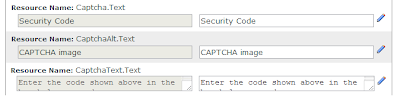

On the left site you will see language editor with two option Local Resources and Global Resource click the + on Global Resources you will see four option click on Shared Resources.

Subscribe to:
Posts (Atom)