If you moved Sitefinity from one server to another you might run into this issue Access denied on App_Data folder.
To solve this issue on IIS 7.5 you need to give permission to the user that is associated with app pool. So let's say the name of your application is xyz.com then you need to go to App_Data folder and go to properties and add IIS AppPool\xyz.com and give read/write access to it.
That should do it.
If you have any question. Please contact us.
~AL
Tuesday, January 14, 2014

Wednesday, May 29, 2013
MYSQL Create new user and Grant privileges
To Create a new user in mysql
CREATE USER 'UserName'@'localhost' IDENTIFIED BY 'Password';
To Grant user access to the Database
GRANT ALL PRIVILEGES ON DatabaseName . * TO 'UserName'@'localhost';
After that Flush the privileges so the changes will take affect.
FLUSH PRIVILEGES;
Friday, May 3, 2013
Error on IIS 7 or IIS 7.5 running .Net 1.1: \\?\C:\Windows\system32\inetsrv\config\applicationHost.config
If you try to change any property of an application that was build with dot net 1.1 on IIS 7 or IIS 7.5 get an error \\?\C:\Windows\system32\inetsrv\config\applicationHost.config. To fix this issue follow the instruction in this article.
This is an error you will get.
This is an error you will get.
There was an error while performing this operation.
Details:
Filename:
\\?\C:\Windows\system32\inetsrv\config\applicationHost.config
Error:
\\?\C:\Windows\system32\inetsrv\config\applicationHost.config
Error:
To fix this issue try this.
- Create the Framework64 directory for 1.1
md \windows\microsoft.net\framework64\v1.1.4322\config\ - Copy the 32bit config to 64bit config location created in step 1.
copy \windows\microsoft.net\framework\v1.1.4322\config\machine.config \windows\microsoft.net\framework64\v1.1.4322\config\
Read more about c:\windows\system32\inetsrv\config\applicationhost.config or contact us.
Tuesday, April 23, 2013
How to turn on or off full text indexing in MS SQL server with sp_fulltext_database
Here is the snytax for it.
action is an argument and it's type of varchar(20) and it could be enable or disable
To turn on full text indexing in MS SQL server with sp_fulltext_database try this.
To turn off full text indexing in MS SQL server with sp_fulltext_database try this:
sp_fulltext_database [@action=] 'action'
action is an argument and it's type of varchar(20) and it could be enable or disable
To turn on full text indexing in MS SQL server with sp_fulltext_database try this.
USE Database_name;
GO
EXEC sp_fulltext_database 'enable';
GO
To turn off full text indexing in MS SQL server with sp_fulltext_database try this:
USE Database_name;
GO
EXEC sp_fulltext_database 'disable';
GO
To run sp_fulltext_database you have to be db_owner or sysadmin
Wednesday, April 17, 2013
Login to MySql database form command line
To login to MySql database from a commend line you can use
mysql -u root -p;
after hitting enter system will ask you for the password or you can use this command
mysql -u root -pPassword;
Once login to the database you have to select the database to work with.
mysql -u root -p;
after hitting enter system will ask you for the password or you can use this command
mysql -u root -pPassword;
Once login to the database you have to select the database to work with.
MySql view database list, switch database and list tables
If you are running MySql form command line and you like to see list of all the database then simply run this command after login to the mysql
show databases;
this command will list all the database that are on MySql server.
If you like to work with one of the database then you can select the database with.
use database_name;
Once in the Database you like to see the list of the table use.
show tables;
This command will show the list of all the tables in that database.
show databases;
this command will list all the database that are on MySql server.
If you like to work with one of the database then you can select the database with.
use database_name;
Once in the Database you like to see the list of the table use.
show tables;
This command will show the list of all the tables in that database.
MySql Backup Database with mysqldump
To backup MySql Database from command line.
mysqldump -u user_name -p Database_Name > backup-file.sql
In windows xp, 7, or 8 simply run the above command in CMD. It will place the backup-file.sql in the same direcotry where you run the command from.
for more information look at mysqldump
mysqldump -u user_name -p Database_Name > backup-file.sql
In windows xp, 7, or 8 simply run the above command in CMD. It will place the backup-file.sql in the same direcotry where you run the command from.
for more information look at mysqldump
Wednesday, January 2, 2013
DNN Form and List module change the label for CAPTCHA
To change the label for the Captcha on the form and list module go to Admin -> Languages then click on the edit icon under static resources site for the culture english or for the language pack you like to change the text for.

On the left site you will see language editor with two option Local Resources and Global Resource click the + on Global Resources you will see four option click on Shared Resources.

Page will reload and on that page search for CaptchaText.Text. Click on the edit icon next to the text box and update the value you like and click update you are done.
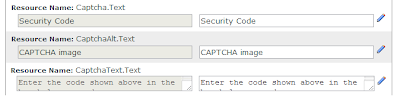

On the left site you will see language editor with two option Local Resources and Global Resource click the + on Global Resources you will see four option click on Shared Resources.

Tuesday, January 1, 2013
Running your web application on iPhone as it's a native app
Configure your Web Application to work on iPhone/iPad/iPod as it is a Native app.

Change the "href" with your own image name and location.
Change the "href" to your image name and location.
Step 4: Hiding safari user interface components
Once the user tap the app icon on the home screen, you want it to open in standalone mode so it looks more like native application to achieve that add this meta tag:
window.navigator.standalone
Step 5: Changing the status bar appearance
In order to change the status bar appearance you have to have apple-mobile-web-app-capable meta tag in your page's head section. The meta tag is as below:
<meta name="apple-mobile-web-app-status-bar-style" content="black" />
There are three option for content.
black - Content will show under the status bar
Start of with your web application, make sure it's bug free and ready to go live. Next step is to open the application on your iPhone and make sure the CSS is working the way you like it on the iPhone. Once every thing looks good on "iPhone safari", then you are ready to configure the web application to work on iPhone safari full screen.
We need to add few meta tags in applications head section of the page. So let's get this done. There are 6 steps.
Step 1: Suggest user to add this web application on the home screen.

To run the web application in the full browser mode, we need to bookmark the application on the home screen. To do that we will use a excellent JQuery by Matteo Spinelli that will remind the user to bookmark the application on the home screen once they open your application on iPhone safari browser. You can download the Code and how to set up from Add to Home Screen.
Step 2: Web clip webpage icon
Once the user tap on the Add to home screen on iPhone, it will create an icon from the web application or you can upload a custom icon to use for this application. All you need is a 57px X 57px icon. Once you save it iPhone will add the round corners and glossy effect for you so you don't have to worry about it.
There are few different Apple devices out there with different sizes for the icon, below is a list of them. Put them on your html page under the head section, that will save a custom icon on the home screen.
Normal (57 X 57 no retina display)
<link rel="apple-touch-icon" href="icon.png"/>
Normal iPad (72 X 72 no retina display)
<link rel="apple-touch-icon" href="icon72.png" sizes="72x72"/>
For iPhone (114 X 114 retina display)
<link rel="apple-touch-icon" href="icon114.png" sizes="114x114"/>
For iPad (144 X 144 retina display)
<link rel="apple-touch-icon" href="icon144.png" sizes="144x144"/>
Change the "href" with your own image name and location.
You can find out more information on custom icon.
Step 3: Specifying a start up image
I love it when user tap on the web app icon on the home screen and it shows them a splash image like it's not a web app but a native app. It will not show safari loading your app but your custom image. The meta tag you need to add for this is:
<link rel="apple-touch-startup-image" href="/splash.png">
Change the "href" to your image name and location.
Step 4: Hiding safari user interface components
Once the user tap the app icon on the home screen, you want it to open in standalone mode so it looks more like native application to achieve that add this meta tag:
<meta name="apple-mobile-web-app-capable" content="yes" />
If you want to check if app is in standalone mode then you can check it, with this read only property in java script. If you are in standalone mode then it will return true else false.window.navigator.standalone
Step 5: Changing the status bar appearance
In order to change the status bar appearance you have to have apple-mobile-web-app-capable meta tag in your page's head section. The meta tag is as below:
<meta name="apple-mobile-web-app-status-bar-style" content="black" />
There are three option for content.
black - Content will show under the status bar
default - Content will show under the status bar
black-translucent - Content will show on the full screen, so the status bar will come over the content.
Step 6: Staying inside the safari standalone mode when clicking on links
One big issue that comes up in web application when running in standalone mode is that when user click on a link it will open up in safari not in the standalone mode or full screen mode. To over come this we will replace all the link tags <a/> with JQuery so that instead of doing the default task we change the location of the standalone screen. To do that, just add this JQuery on your page:
$(document).on(
"click",
"a",
function (event) {
if (window.navigator.standalone) {
// Stop the default behavior that will open in all the links in safari.
event.preventDefault();
// Change the location of the page to stay in "Standalone" mode.
location.href = $(this).attr('href');
}
}
);
That's all you need to run your web application on iPhone as if it is a native app, easy as 1,2,3 rite?
black-translucent - Content will show on the full screen, so the status bar will come over the content.
Step 6: Staying inside the safari standalone mode when clicking on links
One big issue that comes up in web application when running in standalone mode is that when user click on a link it will open up in safari not in the standalone mode or full screen mode. To over come this we will replace all the link tags <a/> with JQuery so that instead of doing the default task we change the location of the standalone screen. To do that, just add this JQuery on your page:
$(document).on(
"click",
"a",
function (event) {
if (window.navigator.standalone) {
// Stop the default behavior that will open in all the links in safari.
event.preventDefault();
// Change the location of the page to stay in "Standalone" mode.
location.href = $(this).attr('href');
}
}
);
That's all you need to run your web application on iPhone as if it is a native app, easy as 1,2,3 rite?
Tuesday, May 22, 2012
How to check if an image exist on the remover server in PHP
If you are using a remote image or file in you PHP application and like to make sure image exist before using the image. It will help you keep you application clean if the image exist then you can show the image and if the image is removed that you don't have any control over, you can show the placeholder image or don't show any image.
So how it's done.
This function is fast when it comes to checking the image file or any other file.
So we are passing in variable called $url in this function. that is then passed into the File_Get_Contents function and it only get 1 bit from the file. If file_get_contents get 1 bit then this function will return 1 else it will return 0. you can use that in you code to show the image or don't it's you call.
So how it's done.
function Check_Image($url)
{
 if(@file_get_contents($url,0,NULL,0,1))
 {
  return 1;
 }
 else
 {
  return 0;
 }
}
This function is fast when it comes to checking the image file or any other file.
So we are passing in variable called $url in this function. that is then passed into the File_Get_Contents function and it only get 1 bit from the file. If file_get_contents get 1 bit then this function will return 1 else it will return 0. you can use that in you code to show the image or don't it's you call.
Friday, November 4, 2011
ASP.NET runtime error: The base class includes the field 'ScriptManager1', but its type (System.Web.UI.ScriptManager) is not compatible with the type of control (System.Web.UI.ScriptManager)
You will get this error when you have more then one AJAX Tool kit version install on the same computer. To solve this issue you need to add this code in you Web.config file.
<runtime>
<assemblyBinding xmlns="urn:schemas-microsoft-com:asm.v1">
<dependentAssembly>
<assemblyIdentity name="System.Web.Extensions" publicKeyToken="31bf3856ad364e35" Culture="neutral"/>
<bindingRedirect oldVersion="1.0.61025.0" newVersion="3.5.0.0"/>
<publisherProfile apply="no"/>
</dependentAssembly>
</assemblyBinding>
</runtime>
This will tell the application at run time which verison of the AJAX to use.
<runtime>
<assemblyBinding xmlns="urn:schemas-microsoft-com:asm.v1">
<dependentAssembly>
<assemblyIdentity name="System.Web.Extensions" publicKeyToken="31bf3856ad364e35" Culture="neutral"/>
<bindingRedirect oldVersion="1.0.61025.0" newVersion="3.5.0.0"/>
<publisherProfile apply="no"/>
</dependentAssembly>
</assemblyBinding>
</runtime>
This will tell the application at run time which verison of the AJAX to use.
Sunday, July 24, 2011
Random result in MS SQL
To get Random result form a MS SQL table you can user newid(). This will give you random order of rows each time you run the SQL statement.
This will give you the Random Rows from you table.
SELECT
    TOP 10 *
FROM
    [table_name]
Where
    [Where Condition]
Order by NEWID()
This will give you the Random Rows from you table.
Friday, June 24, 2011
Corner Banner or Rotate text with CSS
 To rotate text in all browsers is not easy with simple CSS and HTML with out using image. But it's do able and it's really simple. Let's have a text at -45 degree in left top corner of a web page. That will look something like in the image.
First we need simple HTML for the text so let's get that out of the way.
<!DOCTYPE html>
<html>
<head>
<link href="rotate.css" rel="stylesheet" />
<!--[if lt IE 9]>
<link href="ie.css" rel="stylesheet" />
<![endif]-->
</head>
<body>
<span id="corner-banner">
<em>beta</em>
</span>
</body>
</html>
Then we need some CSS for it. save this as rotate.css.
#corner-banner {
position: absolute;
left: -65px;
top: 25px;
display: block;
width: 200px;
background: #333; /* old browsers */
background: -moz-linear-gradient(top, #333 0%, #000 100%); /* firefox */
background: -webkit-gradient(linear, left top, left bottom, color-stop(0%,#333), color-stop(100%,#000)); /* webkit */
text-align:center;
font-size:11px;
line-height:13px;
padding:3px 3px 4px 3px;
text-shadow: #000 1px 1px 0;
-moz-transform: rotate(-45deg); /* FF3.5+ */
-o-transform: rotate(-45deg); /* Opera 10.5 */
-webkit-transform: rotate(-45deg); /* Saf3.1+, Chrome */
transform: rotate(-45deg); /* CSS3 (for when it gets supported) */
box-shadow: rgba(0,0,0, 0.2) 0px 0px 6px;
-moz-box-shadow: rgba(0,0,0, 0.2) 0px 0px 6px;
-webkit-box-shadow: rgba(0,0,0, 0.2) 0px 0px 6px;
-o-box-shadow: rgba(0,0,0, 0.2) 0px 0px 6px;
}
#corner-banner em {letter-spacing:1px;font-style:normal;font-size:18px !important;color:#fff;text-transform:uppercase;line-height:12px;display:block;}
This will show the banner in the FF, Safari, Opera and Chrome with out any problem but what we do for IE. For IE we will put in this style. save this as ie.css
#corner-banner {
text-align:center;
left: -40px;
top: -40px;
filter: progid:DXImageTransform.Microsoft.Matrix(sizingMethod='auto expand', M11=0.7071067811865476, M12=0.7071067811865475, M21=-0.7071067811865475, M22=0.7071067811865476); /* IE6,IE7 */
-ms-filter: "progid:DXImageTransform.Microsoft.Matrix(SizingMethod='auto expand', M11=0.7071067811865476, M12=0.7071067811865475, M21=-0.7071067811865475, M22=0.7071067811865476)"; /* IE8 */
}
Now this is for only -45 degree angle to understand how the text rotation work in IE you need to know what is M11, M12, M21 and M22. Well they are the value for the angle in our case it is -45 degree value of cos theta and sign theta. You can get them with your scientific calculator or use the web Scientific Calculator. But how do we know what value to put in for M11, M12, M21 and M22.
well here you go.
M11 = COS THETA,
M12 = SIN THETA,
M21 = -SIN THETA,
M22 = COS THETA
above order will give us -45 degree angel but let's say if we want 45 degree angle then we will use this.
M11 = COS THETA,
M12 = -SIN THETA,
M21 = SIN THETA,
M22 = COS THETA
Only we need to change the M12 and M21 value to +/-.
Hope this helped with rotating text in IE. NO NEED TO USE IMAGES
Thursday, June 23, 2011
Deleting Duplicates from MS SQL table
To delete duplicates form a table is very easy. Before you delete any thing from the table make sure to back up the DB or the table before running this command. There is the SQL statement that will do the trick.
DELETE
FROM [table_name]
WHERE [Column_ID] NOT IN
(
SELECT MAX([Column_ID])
FROM [table_name]
GROUP BY [Column name])
Where [Column name] is the column that you think have duplicate value. Give it a shot!!
DELETE
FROM [table_name]
WHERE [Column_ID] NOT IN
(
SELECT MAX([Column_ID])
FROM [table_name]
GROUP BY [Column name])
Where [Column name] is the column that you think have duplicate value. Give it a shot!!
Check when the MS SQL Store Procedure were updated
To check the MS SQL Store Procedures updated date and time use this SQL statement.
SELECT name, create_date, modify_date
FROM sys.objects
WHERE type = 'P'
ORDER BY modify_date DESC
Some time when you are developing. It is hard to keep track of the SP when they got updated or not this way you will know which SP to move to the live server from your development server.
SELECT name, create_date, modify_date
FROM sys.objects
WHERE type = 'P'
ORDER BY modify_date DESC
Some time when you are developing. It is hard to keep track of the SP when they got updated or not this way you will know which SP to move to the live server from your development server.
Wednesday, June 22, 2011
WebResource.axd and ScriptResource.axd error
If you are getting the WebResource.axd and ScriptResource.axd Java script error on your asp.net page and you are using the IIS 7.0 with IIS URL rewrite.
There is a very good chance that you have a URL rewrite rule that Enforce lowercase URLs. If that is the case then make sure that you a condition in there that will not force the WebResource.axd and ScripResource.axd to lowercase. Once you add the Rule form the IIS GUI. It will look some thing like this in the web.config file.
<rule name="LowerCaseRule1" stopProcessing="true">
<match url="[A-Z]" ignoreCase="false" />
<action type="Redirect" url="{ToLower:{URL}}" />
<conditions>
<add input="{URL}" pattern="WebResource.axd" negate="true" />
<add input="{URL}" pattern="ScriptResource.axd" negate="true" />
</conditions>
</rule>
The Other reason could be that you have a page that looks something like this http://www.url.com/page.aspx?id=1 and have a rule that will rewrite the URL to http://www.url.com/1 that will give you the WebResource.axd and ScriptResource.axd error. Make sure that when you rewrite the URL include the page name too. some thing like this http://www.url.com/page/1. That will fix the issue too.
There is a very good chance that you have a URL rewrite rule that Enforce lowercase URLs. If that is the case then make sure that you a condition in there that will not force the WebResource.axd and ScripResource.axd to lowercase. Once you add the Rule form the IIS GUI. It will look some thing like this in the web.config file.
<rule name="LowerCaseRule1" stopProcessing="true">
<match url="[A-Z]" ignoreCase="false" />
<action type="Redirect" url="{ToLower:{URL}}" />
<conditions>
<add input="{URL}" pattern="WebResource.axd" negate="true" />
<add input="{URL}" pattern="ScriptResource.axd" negate="true" />
</conditions>
</rule>
The Other reason could be that you have a page that looks something like this http://www.url.com/page.aspx?id=1 and have a rule that will rewrite the URL to http://www.url.com/1 that will give you the WebResource.axd and ScriptResource.axd error. Make sure that when you rewrite the URL include the page name too. some thing like this http://www.url.com/page/1. That will fix the issue too.
Subscribe to:
Posts (Atom)